Showing posts with label Lucky Patcher. Show all posts

November 17, 2014

Lucky Patcher 5.1.9 Apk Direct Link By Chelpus

Lucky Patcher

Lucky Patcher

Lucky Patcher
Description
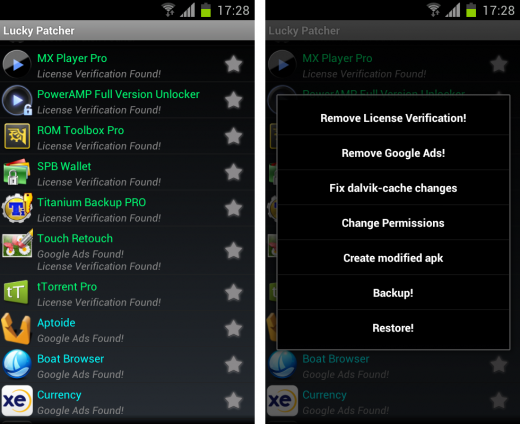
Green - This program has a great chance to become a registered;
Yellow - For this Program found custom patch in folder /sdcard/LuckyPatcher/;
Cyan - For this Program found Google Ads;
Magenta - This program are in BootList;
Impossible - This program has no chance of becoming a registered. The exception is the application of two parts (Application and APK-Pro-Key). In such cases, patch both sides, either one of them.;
Orange - System Application. Be very careful when performing any operations with them, it could end very badly for Application or Operating System.;

BootList - a list of programs that will patch the boot device. At this point, it use only for Applications requiring the correction of libraries ".so". But custom patches do not exist, except for the old Titanium backup, which is no longer in use.;

Star - means that dalvik-cache applications has been fixed(ODEX with Changes created), and this in turn means that the application will remain in its current state until the first update, or delete an application. If such ODEX removed with "Remove ODEX with Changes", then the application will be fully restored to the state before the patch. When you update an application, problems can arise: the market will swear that he had not enough space, run Lucky Patcher and close and try again to install the application, if such an error is written to the uninstalled application select the settings Luckypatcher "Troubleshooting->Remove fixes and backups (to update app)" - all fixes dalvik-cache for all programs will be removed;

For Remove License Verification:
- Use as target only original apk files signed by the developer;
- Tap to Software and select "Remove License Verification!";
- Select "Auto mode" and test Application with Internet;
- If the result is negative, Select "Extreme Auto mode";
- If you're lucky, your program will be registered;
- To return Application to its original state, you need to tap "Remove ODEX with Changes".

For Remove Google Ads:
- Tap to Software and select "Remove Google Ads!";
- Run and test Application with Internet;
- If you're lucky, Google Ads disappeared;
- To return Application to its original state, you need to tap "Remove ODEX with Changes".

For Custom Patch:
- Tap to Software and select "Custom Patch!";
- Run and test Application with Internet;
- If you're lucky, patch work;
- To return Application to its original state, you need to tap "Remove ODEX with Changes".

For Change Permissions:
- Be very careful doing this. Since the on some devices, this method can lead to a circular reboot or other undesirable consequences. Make a backup system before you try to disable permission. - Tap to Software and select "Change Permissions";
- Tap to Permission for disable (red);
- Tap to Permission for enable (green);
- You must tap Apply (Reboot).

For Create Modified APK:
- Tap to Software and select "Create Modified APK";
- Select Patch for Modification of APK;
- Modified installation file will be in folder /sdcard/LuckPatcher/Modified/ ;
- You should know that a rebuild apk-file is not the same as the patch is already installed application. Since the as opposed to simply patch the application is very easy to test yourself to changes, and thus work correctly so faly The install will not..

PS: Patcher closes the application, when makes patches. This is necessary so that the new changes earned. But sometimes you may need to restart the device itself or use a third-party tools to kill the process of Applications.

What's New:
#Version 3.6.2.1 :
-Custom patch for "WidgetLocker" v2.4.1 updated.

#Version 3.6.2 :
-Add custom patch for "WidgetLocker" v2.4.1.
-Custom patch for "Greenify" updated.

#Version 3.6.1 :
-Add custom patch for "GO SMS Pro" v5.26 (Recent) to enable all premium features and remove ads (By ChelpuS - Code patch).
-Add custom patch for "Kii Keyboard".
-Add custom patch for "Xprivacy Pro" v1.10.
-Add custom patch for "Greenify" (Support patch to work with modded Google Play and for patch Pro-key).

Apps Details
-Price: Free
-Version: 5.1.6
-Size: 2.5 MB
-Required android: 1.5 and up
-Developer: Chelpus

Instruction:
-Install Apk
-Launch the App

Helpfull Links

-Check New version : Check Now


Download Links

-Direct Link - 1 : Download Now (Latest)

-Direct Link - 2 : Download Now (5.1.9)

-Direct Link - 3 : Download Now (5.1.9)

Posted By: DroApk 11/17/2014

April 15, 2014

Lucky Patcher 4.3.1 Apk Direct Link By Chelpus


Description
Green - This program has a great chance to become a registered;
Yellow - For this Program found custom patch in folder /sdcard/LuckyPatcher/;
Cyan - For this Program found Google Ads;
Magenta - This program are in BootList;
Impossible - This program has no chance of becoming a registered. The exception is the application of two parts (Application and APK-Pro-Key). In such cases, patch both sides, either one of them.;
Orange - System Application. Be very careful when performing any operations with them, it could end very badly for Application or Operating System.;

BootList - a list of programs that will patch the boot device. At this point, it use only for Applications requiring the correction of libraries ".so". But custom patches do not exist, except for the old Titanium backup, which is no longer in use.;

Star - means that dalvik-cache applications has been fixed(ODEX with Changes created), and this in turn means that the application will remain in its current state until the first update, or delete an application. If such ODEX removed with "Remove ODEX with Changes", then the application will be fully restored to the state before the patch. When you update an application, problems can arise: the market will swear that he had not enough space, run Lucky Patcher and close and try again to install the application, if such an error is written to the uninstalled application select the settings Luckypatcher "Troubleshooting->Remove fixes and backups (to update app)" - all fixes dalvik-cache for all programs will be removed;

For Remove License Verification:
- Use as target only original apk files signed by the developer;
- Tap to Software and select "Remove License Verification!";
- Select "Auto mode" and test Application with Internet;
- If the result is negative, Select "Extreme Auto mode";
- If you're lucky, your program will be registered;
- To return Application to its original state, you need to tap "Remove ODEX with Changes".

For Remove Google Ads:
- Tap to Software and select "Remove Google Ads!";
- Run and test Application with Internet;
- If you're lucky, Google Ads disappeared;
- To return Application to its original state, you need to tap "Remove ODEX with Changes".

For Custom Patch:
- Tap to Software and select "Custom Patch!";
- Run and test Application with Internet;
- If you're lucky, patch work;
- To return Application to its original state, you need to tap "Remove ODEX with Changes".

For Change Permissions:
- Be very careful doing this. Since the on some devices, this method can lead to a circular reboot or other undesirable consequences. Make a backup system before you try to disable permission. - Tap to Software and select "Change Permissions";
- Tap to Permission for disable (red);
- Tap to Permission for enable (green);
- You must tap Apply (Reboot).

For Create Modified APK:
- Tap to Software and select "Create Modified APK";
- Select Patch for Modification of APK;
- Modified installation file will be in folder /sdcard/LuckPatcher/Modified/ ;
- You should know that a rebuild apk-file is not the same as the patch is already installed application. Since the as opposed to simply patch the application is very easy to test yourself to changes, and thus work correctly so faly The install will not..

PS: Patcher closes the application, when makes patches. This is necessary so that the new changes earned. But sometimes you may need to restart the device itself or use a third-party tools to kill the process of Applications.

What's New:
#Version 3.6.2.1 :
-Custom patch for "WidgetLocker" v2.4.1 updated.

#Version 3.6.2 :
-Add custom patch for "WidgetLocker" v2.4.1.
-Custom patch for "Greenify" updated.

#Version 3.6.1 :
-Add custom patch for "GO SMS Pro" v5.26 (Recent) to enable all premium features and remove ads (By ChelpuS - Code patch).
-Add custom patch for "Kii Keyboard".
-Add custom patch for "Xprivacy Pro" v1.10.
-Add custom patch for "Greenify" (Support patch to work with modded Google Play and for patch Pro-key).
Apps Details
-Price: Free
-Version: 4.3.1
-Size: 2.5 MB
-Required android: 1.5 and up
-Developer: Chelpus

Instruction:
-Install Apk
-Launch the App

Helpfull Links

-Check New version : Check Now


Download Links

-Direct Link - 1 : Download Now (Latest)

-Direct Link - 2 : Download Now (4.3.1)

-Direct Link - 3 : Download Now (4.3.1)

Posted By: DroApk 4/15/2014

April 04, 2014

Lucky Patcher 4.2.7 Apk Direct Link By Chelpus


Description
Green - This program has a great chance to become a registered;
Yellow - For this Program found custom patch in folder /sdcard/LuckyPatcher/;
Cyan - For this Program found Google Ads;
Magenta - This program are in BootList;
Impossible - This program has no chance of becoming a registered. The exception is the application of two parts (Application and APK-Pro-Key). In such cases, patch both sides, either one of them.;
Orange - System Application. Be very careful when performing any operations with them, it could end very badly for Application or Operating System.;

BootList - a list of programs that will patch the boot device. At this point, it use only for Applications requiring the correction of libraries ".so". But custom patches do not exist, except for the old Titanium backup, which is no longer in use.;

Star - means that dalvik-cache applications has been fixed(ODEX with Changes created), and this in turn means that the application will remain in its current state until the first update, or delete an application. If such ODEX removed with "Remove ODEX with Changes", then the application will be fully restored to the state before the patch. When you update an application, problems can arise: the market will swear that he had not enough space, run Lucky Patcher and close and try again to install the application, if such an error is written to the uninstalled application select the settings Luckypatcher "Troubleshooting->Remove fixes and backups (to update app)" - all fixes dalvik-cache for all programs will be removed;

For Remove License Verification:
- Use as target only original apk files signed by the developer;
- Tap to Software and select "Remove License Verification!";
- Select "Auto mode" and test Application with Internet;
- If the result is negative, Select "Extreme Auto mode";
- If you're lucky, your program will be registered;
- To return Application to its original state, you need to tap "Remove ODEX with Changes".

For Remove Google Ads:
- Tap to Software and select "Remove Google Ads!";
- Run and test Application with Internet;
- If you're lucky, Google Ads disappeared;
- To return Application to its original state, you need to tap "Remove ODEX with Changes".

For Custom Patch:
- Tap to Software and select "Custom Patch!";
- Run and test Application with Internet;
- If you're lucky, patch work;
- To return Application to its original state, you need to tap "Remove ODEX with Changes".

For Change Permissions:
- Be very careful doing this. Since the on some devices, this method can lead to a circular reboot or other undesirable consequences. Make a backup system before you try to disable permission. - Tap to Software and select "Change Permissions";
- Tap to Permission for disable (red);
- Tap to Permission for enable (green);
- You must tap Apply (Reboot).

For Create Modified APK:
- Tap to Software and select "Create Modified APK";
- Select Patch for Modification of APK;
- Modified installation file will be in folder /sdcard/LuckPatcher/Modified/ ;
- You should know that a rebuild apk-file is not the same as the patch is already installed application. Since the as opposed to simply patch the application is very easy to test yourself to changes, and thus work correctly so faly The install will not..

PS: Patcher closes the application, when makes patches. This is necessary so that the new changes earned. But sometimes you may need to restart the device itself or use a third-party tools to kill the process of Applications.

What's New:
#Version 3.6.2.1 :
-Custom patch for "WidgetLocker" v2.4.1 updated.

#Version 3.6.2 :
-Add custom patch for "WidgetLocker" v2.4.1.
-Custom patch for "Greenify" updated.

#Version 3.6.1 :
-Add custom patch for "GO SMS Pro" v5.26 (Recent) to enable all premium features and remove ads (By ChelpuS - Code patch).
-Add custom patch for "Kii Keyboard".
-Add custom patch for "Xprivacy Pro" v1.10.
-Add custom patch for "Greenify" (Support patch to work with modded Google Play and for patch Pro-key).
Apps Details
-Price: Free
-Version: 4.2.7
-Size: 2.5 MB
-Required android: 1.5 and up
-Developer: Chelpus

Instruction:
-Install Apk
-Launch the App

Helpfull Links

-Check New version : Check Now


Download Links

-Direct Link - 1 : Download Now (Latest)

-Direct Link - 2 : Download Now (4.2.7)

-Direct Link - 3 : Download Now (4.2.7)

Posted By: DroApk 4/04/2014

March 21, 2014

Lucky Patcher 4.2.5 Apk Direct Link By Chelpus


Description
Green - This program has a great chance to become a registered;
Yellow - For this Program found custom patch in folder /sdcard/LuckyPatcher/;
Cyan - For this Program found Google Ads;
Magenta - This program are in BootList;
Impossible - This program has no chance of becoming a registered. The exception is the application of two parts (Application and APK-Pro-Key). In such cases, patch both sides, either one of them.;
Orange - System Application. Be very careful when performing any operations with them, it could end very badly for Application or Operating System.;

BootList - a list of programs that will patch the boot device. At this point, it use only for Applications requiring the correction of libraries ".so". But custom patches do not exist, except for the old Titanium backup, which is no longer in use.;

Star - means that dalvik-cache applications has been fixed(ODEX with Changes created), and this in turn means that the application will remain in its current state until the first update, or delete an application. If such ODEX removed with "Remove ODEX with Changes", then the application will be fully restored to the state before the patch. When you update an application, problems can arise: the market will swear that he had not enough space, run Lucky Patcher and close and try again to install the application, if such an error is written to the uninstalled application select the settings Luckypatcher "Troubleshooting->Remove fixes and backups (to update app)" - all fixes dalvik-cache for all programs will be removed;

For Remove License Verification:
- Use as target only original apk files signed by the developer;
- Tap to Software and select "Remove License Verification!";
- Select "Auto mode" and test Application with Internet;
- If the result is negative, Select "Extreme Auto mode";
- If you're lucky, your program will be registered;
- To return Application to its original state, you need to tap "Remove ODEX with Changes".

For Remove Google Ads:
- Tap to Software and select "Remove Google Ads!";
- Run and test Application with Internet;
- If you're lucky, Google Ads disappeared;
- To return Application to its original state, you need to tap "Remove ODEX with Changes".

For Custom Patch:
- Tap to Software and select "Custom Patch!";
- Run and test Application with Internet;
- If you're lucky, patch work;
- To return Application to its original state, you need to tap "Remove ODEX with Changes".

For Change Permissions:
- Be very careful doing this. Since the on some devices, this method can lead to a circular reboot or other undesirable consequences. Make a backup system before you try to disable permission. - Tap to Software and select "Change Permissions";
- Tap to Permission for disable (red);
- Tap to Permission for enable (green);
- You must tap Apply (Reboot).

For Create Modified APK:
- Tap to Software and select "Create Modified APK";
- Select Patch for Modification of APK;
- Modified installation file will be in folder /sdcard/LuckPatcher/Modified/ ;
- You should know that a rebuild apk-file is not the same as the patch is already installed application. Since the as opposed to simply patch the application is very easy to test yourself to changes, and thus work correctly so faly The install will not..

PS: Patcher closes the application, when makes patches. This is necessary so that the new changes earned. But sometimes you may need to restart the device itself or use a third-party tools to kill the process of Applications.

What's New:
#Version 3.6.2.1 :
-Custom patch for "WidgetLocker" v2.4.1 updated.

#Version 3.6.2 :
-Add custom patch for "WidgetLocker" v2.4.1.
-Custom patch for "Greenify" updated.

#Version 3.6.1 :
-Add custom patch for "GO SMS Pro" v5.26 (Recent) to enable all premium features and remove ads (By ChelpuS - Code patch).
-Add custom patch for "Kii Keyboard".
-Add custom patch for "Xprivacy Pro" v1.10.
-Add custom patch for "Greenify" (Support patch to work with modded Google Play and for patch Pro-key).
Apps Details
-Price: Free
-Version: 4.2.5
-Size: 2.5 MB
-Required android: 1.5 and up
-Developer: Chelpus

Instruction:
-Install Apk
-Launch the App

Helpfull Links

-Check New version : Check Now


Download Links

-Direct Link - 1 : Download Now (Latest)

-Direct Link - 2 : Download Now (4.2.5)

-Direct Link - 3 : Download Now (4.2.5)

Posted By: DroApk 3/21/2014

March 19, 2014

Lucky Patcher 4.2.1 Apk Direct Link By Chelpus


Description
Green - This program has a great chance to become a registered;
Yellow - For this Program found custom patch in folder /sdcard/LuckyPatcher/;
Cyan - For this Program found Google Ads;
Magenta - This program are in BootList;
Impossible - This program has no chance of becoming a registered. The exception is the application of two parts (Application and APK-Pro-Key). In such cases, patch both sides, either one of them.;
Orange - System Application. Be very careful when performing any operations with them, it could end very badly for Application or Operating System.;

BootList - a list of programs that will patch the boot device. At this point, it use only for Applications requiring the correction of libraries ".so". But custom patches do not exist, except for the old Titanium backup, which is no longer in use.;

Star - means that dalvik-cache applications has been fixed(ODEX with Changes created), and this in turn means that the application will remain in its current state until the first update, or delete an application. If such ODEX removed with "Remove ODEX with Changes", then the application will be fully restored to the state before the patch. When you update an application, problems can arise: the market will swear that he had not enough space, run Lucky Patcher and close and try again to install the application, if such an error is written to the uninstalled application select the settings Luckypatcher "Troubleshooting->Remove fixes and backups (to update app)" - all fixes dalvik-cache for all programs will be removed;

For Remove License Verification:
- Use as target only original apk files signed by the developer;
- Tap to Software and select "Remove License Verification!";
- Select "Auto mode" and test Application with Internet;
- If the result is negative, Select "Extreme Auto mode";
- If you're lucky, your program will be registered;
- To return Application to its original state, you need to tap "Remove ODEX with Changes".

For Remove Google Ads:
- Tap to Software and select "Remove Google Ads!";
- Run and test Application with Internet;
- If you're lucky, Google Ads disappeared;
- To return Application to its original state, you need to tap "Remove ODEX with Changes".

For Custom Patch:
- Tap to Software and select "Custom Patch!";
- Run and test Application with Internet;
- If you're lucky, patch work;
- To return Application to its original state, you need to tap "Remove ODEX with Changes".

For Change Permissions:
- Be very careful doing this. Since the on some devices, this method can lead to a circular reboot or other undesirable consequences. Make a backup system before you try to disable permission. - Tap to Software and select "Change Permissions";
- Tap to Permission for disable (red);
- Tap to Permission for enable (green);
- You must tap Apply (Reboot).

For Create Modified APK:
- Tap to Software and select "Create Modified APK";
- Select Patch for Modification of APK;
- Modified installation file will be in folder /sdcard/LuckPatcher/Modified/ ;
- You should know that a rebuild apk-file is not the same as the patch is already installed application. Since the as opposed to simply patch the application is very easy to test yourself to changes, and thus work correctly so faly The install will not..

PS: Patcher closes the application, when makes patches. This is necessary so that the new changes earned. But sometimes you may need to restart the device itself or use a third-party tools to kill the process of Applications.

What's New:
#Version 3.6.2.1 :
-Custom patch for "WidgetLocker" v2.4.1 updated.

#Version 3.6.2 :
-Add custom patch for "WidgetLocker" v2.4.1.
-Custom patch for "Greenify" updated.

#Version 3.6.1 :
-Add custom patch for "GO SMS Pro" v5.26 (Recent) to enable all premium features and remove ads (By ChelpuS - Code patch).
-Add custom patch for "Kii Keyboard".
-Add custom patch for "Xprivacy Pro" v1.10.
-Add custom patch for "Greenify" (Support patch to work with modded Google Play and for patch Pro-key).
Apps Details
-Price: Free
-Version: 4.2.1
-Size: 2.5 MB
-Required android: 1.5 and up
-Developer: Chelpus

Instruction:
-Install Apk
-Launch the App

Helpfull Links

-Check New version : Check Now


Download Links

-Direct Link - 1 : Download Now (Latest)

-Direct Link - 2 : Download Now (4.2.1)

-Direct Link - 3 : Download Now (4.2.1)

Posted By: DroApk 3/19/2014

March 04, 2014

Lucky Patcher 4.1.9 Apk Direct Link By Chelpus


Description
Green - This program has a great chance to become a registered;
Yellow - For this Program found custom patch in folder /sdcard/LuckyPatcher/;
Cyan - For this Program found Google Ads;
Magenta - This program are in BootList;
Impossible - This program has no chance of becoming a registered. The exception is the application of two parts (Application and APK-Pro-Key). In such cases, patch both sides, either one of them.;
Orange - System Application. Be very careful when performing any operations with them, it could end very badly for Application or Operating System.;

BootList - a list of programs that will patch the boot device. At this point, it use only for Applications requiring the correction of libraries ".so". But custom patches do not exist, except for the old Titanium backup, which is no longer in use.;

Star - means that dalvik-cache applications has been fixed(ODEX with Changes created), and this in turn means that the application will remain in its current state until the first update, or delete an application. If such ODEX removed with "Remove ODEX with Changes", then the application will be fully restored to the state before the patch. When you update an application, problems can arise: the market will swear that he had not enough space, run Lucky Patcher and close and try again to install the application, if such an error is written to the uninstalled application select the settings Luckypatcher "Troubleshooting->Remove fixes and backups (to update app)" - all fixes dalvik-cache for all programs will be removed;

For Remove License Verification:
- Use as target only original apk files signed by the developer;
- Tap to Software and select "Remove License Verification!";
- Select "Auto mode" and test Application with Internet;
- If the result is negative, Select "Extreme Auto mode";
- If you're lucky, your program will be registered;
- To return Application to its original state, you need to tap "Remove ODEX with Changes".

For Remove Google Ads:
- Tap to Software and select "Remove Google Ads!";
- Run and test Application with Internet;
- If you're lucky, Google Ads disappeared;
- To return Application to its original state, you need to tap "Remove ODEX with Changes".

For Custom Patch:
- Tap to Software and select "Custom Patch!";
- Run and test Application with Internet;
- If you're lucky, patch work;
- To return Application to its original state, you need to tap "Remove ODEX with Changes".

For Change Permissions:
- Be very careful doing this. Since the on some devices, this method can lead to a circular reboot or other undesirable consequences. Make a backup system before you try to disable permission. - Tap to Software and select "Change Permissions";
- Tap to Permission for disable (red);
- Tap to Permission for enable (green);
- You must tap Apply (Reboot).

For Create Modified APK:
- Tap to Software and select "Create Modified APK";
- Select Patch for Modification of APK;
- Modified installation file will be in folder /sdcard/LuckPatcher/Modified/ ;
- You should know that a rebuild apk-file is not the same as the patch is already installed application. Since the as opposed to simply patch the application is very easy to test yourself to changes, and thus work correctly so faly The install will not..

PS: Patcher closes the application, when makes patches. This is necessary so that the new changes earned. But sometimes you may need to restart the device itself or use a third-party tools to kill the process of Applications.

What's New:
#Version 3.6.2.1 :
-Custom patch for "WidgetLocker" v2.4.1 updated.

#Version 3.6.2 :
-Add custom patch for "WidgetLocker" v2.4.1.
-Custom patch for "Greenify" updated.

#Version 3.6.1 :
-Add custom patch for "GO SMS Pro" v5.26 (Recent) to enable all premium features and remove ads (By ChelpuS - Code patch).
-Add custom patch for "Kii Keyboard".
-Add custom patch for "Xprivacy Pro" v1.10.
-Add custom patch for "Greenify" (Support patch to work with modded Google Play and for patch Pro-key).
Apps Details
-Price: Free
-Version: 1.1.9
-Size: 2.5 MB
-Required android: 1.5 and up
-Developer: Chelpus

Instruction:
-Install Apk
-Launch the App

Helpfull Links

-Check New version : Check Now


Download Links

-Direct Link - 1 : Download Now (Latest)

-Direct Link - 2 : Download Now (4.1.9)

-Direct Link - 3 : Download Now (4.1.9)

Posted By: DroApk 3/04/2014

February 24, 2014

Lucky Patcher 4.1.6 Apk Direct Link By Chelpus


Description
Green - This program has a great chance to become a registered;
Yellow - For this Program found custom patch in folder /sdcard/LuckyPatcher/;
Cyan - For this Program found Google Ads;
Magenta - This program are in BootList;
Impossible - This program has no chance of becoming a registered. The exception is the application of two parts (Application and APK-Pro-Key). In such cases, patch both sides, either one of them.;
Orange - System Application. Be very careful when performing any operations with them, it could end very badly for Application or Operating System.;

BootList - a list of programs that will patch the boot device. At this point, it use only for Applications requiring the correction of libraries ".so". But custom patches do not exist, except for the old Titanium backup, which is no longer in use.;

Star - means that dalvik-cache applications has been fixed(ODEX with Changes created), and this in turn means that the application will remain in its current state until the first update, or delete an application. If such ODEX removed with "Remove ODEX with Changes", then the application will be fully restored to the state before the patch. When you update an application, problems can arise: the market will swear that he had not enough space, run Lucky Patcher and close and try again to install the application, if such an error is written to the uninstalled application select the settings Luckypatcher "Troubleshooting->Remove fixes and backups (to update app)" - all fixes dalvik-cache for all programs will be removed;

For Remove License Verification:
- Use as target only original apk files signed by the developer;
- Tap to Software and select "Remove License Verification!";
- Select "Auto mode" and test Application with Internet;
- If the result is negative, Select "Extreme Auto mode";
- If you're lucky, your program will be registered;
- To return Application to its original state, you need to tap "Remove ODEX with Changes".

For Remove Google Ads:
- Tap to Software and select "Remove Google Ads!";
- Run and test Application with Internet;
- If you're lucky, Google Ads disappeared;
- To return Application to its original state, you need to tap "Remove ODEX with Changes".

For Custom Patch:
- Tap to Software and select "Custom Patch!";
- Run and test Application with Internet;
- If you're lucky, patch work;
- To return Application to its original state, you need to tap "Remove ODEX with Changes".

For Change Permissions:
- Be very careful doing this. Since the on some devices, this method can lead to a circular reboot or other undesirable consequences. Make a backup system before you try to disable permission. - Tap to Software and select "Change Permissions";
- Tap to Permission for disable (red);
- Tap to Permission for enable (green);
- You must tap Apply (Reboot).

For Create Modified APK:
- Tap to Software and select "Create Modified APK";
- Select Patch for Modification of APK;
- Modified installation file will be in folder /sdcard/LuckPatcher/Modified/ ;
- You should know that a rebuild apk-file is not the same as the patch is already installed application. Since the as opposed to simply patch the application is very easy to test yourself to changes, and thus work correctly so faly The install will not..

PS: Patcher closes the application, when makes patches. This is necessary so that the new changes earned. But sometimes you may need to restart the device itself or use a third-party tools to kill the process of Applications.

What's New:
#Version 3.6.2.1 :
-Custom patch for "WidgetLocker" v2.4.1 updated.

#Version 3.6.2 :
-Add custom patch for "WidgetLocker" v2.4.1.
-Custom patch for "Greenify" updated.

#Version 3.6.1 :
-Add custom patch for "GO SMS Pro" v5.26 (Recent) to enable all premium features and remove ads (By ChelpuS - Code patch).
-Add custom patch for "Kii Keyboard".
-Add custom patch for "Xprivacy Pro" v1.10.
-Add custom patch for "Greenify" (Support patch to work with modded Google Play and for patch Pro-key).
Apps Details
-Price: Free
-Version: 1.1.6
-Size: 2.5 MB
-Required android: 1.5 and up
-Developer: Chelpus

Instruction:
-Install Apk
-Launch the App

Helpfull Links

-Check New version : Check Now


Download Links

-Direct Link - 1 : Download Now (Latest)

-Direct Link - 2 : Download Now (4.1.6)

-Direct Link - 3 : Download Now (4.1.6)

Posted By: DroApk 2/24/2014

December 24, 2013

Lucky Patcher 3.8.9 Apk Direct Link


Description
Green - This program has a great chance to become a registered;
Yellow - For this Program found custom patch in folder /sdcard/LuckyPatcher/;
Cyan - For this Program found Google Ads;
Magenta - This program are in BootList;
Impossible - This program has no chance of becoming a registered. The exception is the application of two parts (Application and APK-Pro-Key). In such cases, patch both sides, either one of them.;
Orange - System Application. Be very careful when performing any operations with them, it could end very badly for Application or Operating System.;

BootList - a list of programs that will patch the boot device. At this point, it use only for Applications requiring the correction of libraries ".so". But custom patches do not exist, except for the old Titanium backup, which is no longer in use.;

Star - means that dalvik-cache applications has been fixed(ODEX with Changes created), and this in turn means that the application will remain in its current state until the first update, or delete an application. If such ODEX removed with "Remove ODEX with Changes", then the application will be fully restored to the state before the patch. When you update an application, problems can arise: the market will swear that he had not enough space, run Lucky Patcher and close and try again to install the application, if such an error is written to the uninstalled application select the settings Luckypatcher "Troubleshooting->Remove fixes and backups (to update app)" - all fixes dalvik-cache for all programs will be removed;

For Remove License Verification:
- Use as target only original apk files signed by the developer;
- Tap to Software and select "Remove License Verification!";
- Select "Auto mode" and test Application with Internet;
- If the result is negative, Select "Extreme Auto mode";
- If you're lucky, your program will be registered;
- To return Application to its original state, you need to tap "Remove ODEX with Changes".

For Remove Google Ads:
- Tap to Software and select "Remove Google Ads!";
- Run and test Application with Internet;
- If you're lucky, Google Ads disappeared;
- To return Application to its original state, you need to tap "Remove ODEX with Changes".

For Custom Patch:
- Tap to Software and select "Custom Patch!";
- Run and test Application with Internet;
- If you're lucky, patch work;
- To return Application to its original state, you need to tap "Remove ODEX with Changes".

For Change Permissions:
- Be very careful doing this. Since the on some devices, this method can lead to a circular reboot or other undesirable consequences. Make a backup system before you try to disable permission. - Tap to Software and select "Change Permissions";
- Tap to Permission for disable (red);
- Tap to Permission for enable (green);
- You must tap Apply (Reboot).

For Create Modified APK:
- Tap to Software and select "Create Modified APK";
- Select Patch for Modification of APK;
- Modified installation file will be in folder /sdcard/LuckPatcher/Modified/ ;
- You should know that a rebuild apk-file is not the same as the patch is already installed application. Since the as opposed to simply patch the application is very easy to test yourself to changes, and thus work correctly so faly The install will not..

PS: Patcher closes the application, when makes patches. This is necessary so that the new changes earned. But sometimes you may need to restart the device itself or use a third-party tools to kill the process of Applications.

What's New:
#Version 3.6.2.1 :
-Custom patch for "WidgetLocker" v2.4.1 updated.

#Version 3.6.2 :
-Add custom patch for "WidgetLocker" v2.4.1.
-Custom patch for "Greenify" updated.

#Version 3.6.1 :
-Add custom patch for "GO SMS Pro" v5.26 (Recent) to enable all premium features and remove ads (By ChelpuS - Code patch).
-Add custom patch for "Kii Keyboard".
-Add custom patch for "Xprivacy Pro" v1.10.
-Add custom patch for "Greenify" (Support patch to work with modded Google Play and for patch Pro-key).
Apps Details
-Price: Free
-Version: 3.8.9
-Size: 2.5 MB
-Required android: 1.5 and up

Instruction:
-Install Apk
-Launch the App

Helpfull Links

-Check New version : Check Now


Download Links

-Direct Link - 1 : Download Now (Latest)

-Direct Link - 2 : Download Now (3.8.9)

-Direct Link - 3 : Download Now (3.8.9)

Posted By: DroApk 12/24/2013

December 22, 2013

Lucky Patcher 3.8.7 Apk Direct Link


Description
Green - This program has a great chance to become a registered;
Yellow - For this Program found custom patch in folder /sdcard/LuckyPatcher/;
Cyan - For this Program found Google Ads;
Magenta - This program are in BootList;
Impossible - This program has no chance of becoming a registered. The exception is the application of two parts (Application and APK-Pro-Key). In such cases, patch both sides, either one of them.;
Orange - System Application. Be very careful when performing any operations with them, it could end very badly for Application or Operating System.;

BootList - a list of programs that will patch the boot device. At this point, it use only for Applications requiring the correction of libraries ".so". But custom patches do not exist, except for the old Titanium backup, which is no longer in use.;

Star - means that dalvik-cache applications has been fixed(ODEX with Changes created), and this in turn means that the application will remain in its current state until the first update, or delete an application. If such ODEX removed with "Remove ODEX with Changes", then the application will be fully restored to the state before the patch. When you update an application, problems can arise: the market will swear that he had not enough space, run Lucky Patcher and close and try again to install the application, if such an error is written to the uninstalled application select the settings Luckypatcher "Troubleshooting->Remove fixes and backups (to update app)" - all fixes dalvik-cache for all programs will be removed;

For Remove License Verification:
- Use as target only original apk files signed by the developer;
- Tap to Software and select "Remove License Verification!";
- Select "Auto mode" and test Application with Internet;
- If the result is negative, Select "Extreme Auto mode";
- If you're lucky, your program will be registered;
- To return Application to its original state, you need to tap "Remove ODEX with Changes".

For Remove Google Ads:
- Tap to Software and select "Remove Google Ads!";
- Run and test Application with Internet;
- If you're lucky, Google Ads disappeared;
- To return Application to its original state, you need to tap "Remove ODEX with Changes".

For Custom Patch:
- Tap to Software and select "Custom Patch!";
- Run and test Application with Internet;
- If you're lucky, patch work;
- To return Application to its original state, you need to tap "Remove ODEX with Changes".

For Change Permissions:
- Be very careful doing this. Since the on some devices, this method can lead to a circular reboot or other undesirable consequences. Make a backup system before you try to disable permission. - Tap to Software and select "Change Permissions";
- Tap to Permission for disable (red);
- Tap to Permission for enable (green);
- You must tap Apply (Reboot).

For Create Modified APK:
- Tap to Software and select "Create Modified APK";
- Select Patch for Modification of APK;
- Modified installation file will be in folder /sdcard/LuckPatcher/Modified/ ;
- You should know that a rebuild apk-file is not the same as the patch is already installed application. Since the as opposed to simply patch the application is very easy to test yourself to changes, and thus work correctly so faly The install will not..

PS: Patcher closes the application, when makes patches. This is necessary so that the new changes earned. But sometimes you may need to restart the device itself or use a third-party tools to kill the process of Applications.

What's New:
#Version 3.6.2.1 :
-Custom patch for "WidgetLocker" v2.4.1 updated.

#Version 3.6.2 :
-Add custom patch for "WidgetLocker" v2.4.1.
-Custom patch for "Greenify" updated.

#Version 3.6.1 :
-Add custom patch for "GO SMS Pro" v5.26 (Recent) to enable all premium features and remove ads (By ChelpuS - Code patch).
-Add custom patch for "Kii Keyboard".
-Add custom patch for "Xprivacy Pro" v1.10.
-Add custom patch for "Greenify" (Support patch to work with modded Google Play and for patch Pro-key).
Apps Details
-Price: Free
-Version: 3.8.7
-Size: 2.5 MB
-Required android: 1.5 and up

Instruction:
-Install Apk
-Launch the App

Helpfull Links

-Check New version : Check Now


Download Links

-Direct Link - 1 : Download Now (Latest)

-Direct Link - 2 : Download Now (3.8.6)

-Direct Link - 3 : Download Now (3.8.6)

Posted By: DroApk 12/22/2013

December 16, 2013

Lucky Patcher 3.8.1 Apk Direct Link


Description
Green - This program has a great chance to become a registered;
Yellow - For this Program found custom patch in folder /sdcard/LuckyPatcher/;
Cyan - For this Program found Google Ads;
Magenta - This program are in BootList;
Impossible - This program has no chance of becoming a registered. The exception is the application of two parts (Application and APK-Pro-Key). In such cases, patch both sides, either one of them.;
Orange - System Application. Be very careful when performing any operations with them, it could end very badly for Application or Operating System.;

BootList - a list of programs that will patch the boot device. At this point, it use only for Applications requiring the correction of libraries ".so". But custom patches do not exist, except for the old Titanium backup, which is no longer in use.;

Star - means that dalvik-cache applications has been fixed(ODEX with Changes created), and this in turn means that the application will remain in its current state until the first update, or delete an application. If such ODEX removed with "Remove ODEX with Changes", then the application will be fully restored to the state before the patch. When you update an application, problems can arise: the market will swear that he had not enough space, run Lucky Patcher and close and try again to install the application, if such an error is written to the uninstalled application select the settings Luckypatcher "Troubleshooting->Remove fixes and backups (to update app)" - all fixes dalvik-cache for all programs will be removed;

For Remove License Verification:
- Use as target only original apk files signed by the developer;
- Tap to Software and select "Remove License Verification!";
- Select "Auto mode" and test Application with Internet;
- If the result is negative, Select "Extreme Auto mode";
- If you're lucky, your program will be registered;
- To return Application to its original state, you need to tap "Remove ODEX with Changes".

For Remove Google Ads:
- Tap to Software and select "Remove Google Ads!";
- Run and test Application with Internet;
- If you're lucky, Google Ads disappeared;
- To return Application to its original state, you need to tap "Remove ODEX with Changes".

For Custom Patch:
- Tap to Software and select "Custom Patch!";
- Run and test Application with Internet;
- If you're lucky, patch work;
- To return Application to its original state, you need to tap "Remove ODEX with Changes".

For Change Permissions:
- Be very careful doing this. Since the on some devices, this method can lead to a circular reboot or other undesirable consequences. Make a backup system before you try to disable permission. - Tap to Software and select "Change Permissions";
- Tap to Permission for disable (red);
- Tap to Permission for enable (green);
- You must tap Apply (Reboot).

For Create Modified APK:
- Tap to Software and select "Create Modified APK";
- Select Patch for Modification of APK;
- Modified installation file will be in folder /sdcard/LuckPatcher/Modified/ ;
- You should know that a rebuild apk-file is not the same as the patch is already installed application. Since the as opposed to simply patch the application is very easy to test yourself to changes, and thus work correctly so faly The install will not..

PS: Patcher closes the application, when makes patches. This is necessary so that the new changes earned. But sometimes you may need to restart the device itself or use a third-party tools to kill the process of Applications.

What's New:
#Version 3.6.2.1 :
-Custom patch for "WidgetLocker" v2.4.1 updated.

#Version 3.6.2 :
-Add custom patch for "WidgetLocker" v2.4.1.
-Custom patch for "Greenify" updated.

#Version 3.6.1 :
-Add custom patch for "GO SMS Pro" v5.26 (Recent) to enable all premium features and remove ads (By ChelpuS - Code patch).
-Add custom patch for "Kii Keyboard".
-Add custom patch for "Xprivacy Pro" v1.10.
-Add custom patch for "Greenify" (Support patch to work with modded Google Play and for patch Pro-key).
Apps Details
-Price: Free
-Version: 3.6.7
-Size: 2.5 MB
-Required android: 1.5 and up

Instruction:
-Install Apk
-Launch the App

Helpfull Links

-Check New version : Check Now


Download Links

-Direct Link - 1 : Download Now

-Direct Link - 2 : Download Now

Posted By: DroApk 12/16/2013

November 05, 2013

Lucky Patcher Apk 3.6.7 Direct Link


Description
Green - This program has a great chance to become a registered;
Yellow - For this Program found custom patch in folder /sdcard/LuckyPatcher/;
Cyan - For this Program found Google Ads;
Magenta - This program are in BootList;
Impossible - This program has no chance of becoming a registered. The exception is the application of two parts (Application and APK-Pro-Key). In such cases, patch both sides, either one of them.;
Orange - System Application. Be very careful when performing any operations with them, it could end very badly for Application or Operating System.;

BootList - a list of programs that will patch the boot device. At this point, it use only for Applications requiring the correction of libraries ".so". But custom patches do not exist, except for the old Titanium backup, which is no longer in use.;

Star - means that dalvik-cache applications has been fixed(ODEX with Changes created), and this in turn means that the application will remain in its current state until the first update, or delete an application. If such ODEX removed with "Remove ODEX with Changes", then the application will be fully restored to the state before the patch. When you update an application, problems can arise: the market will swear that he had not enough space, run Lucky Patcher and close and try again to install the application, if such an error is written to the uninstalled application select the settings Luckypatcher "Troubleshooting->Remove fixes and backups (to update app)" - all fixes dalvik-cache for all programs will be removed;

For Remove License Verification:
- Use as target only original apk files signed by the developer;
- Tap to Software and select "Remove License Verification!";
- Select "Auto mode" and test Application with Internet;
- If the result is negative, Select "Extreme Auto mode";
- If you're lucky, your program will be registered;
- To return Application to its original state, you need to tap "Remove ODEX with Changes".

For Remove Google Ads:
- Tap to Software and select "Remove Google Ads!";
- Run and test Application with Internet;
- If you're lucky, Google Ads disappeared;
- To return Application to its original state, you need to tap "Remove ODEX with Changes".

For Custom Patch:
- Tap to Software and select "Custom Patch!";
- Run and test Application with Internet;
- If you're lucky, patch work;
- To return Application to its original state, you need to tap "Remove ODEX with Changes".

For Change Permissions:
- Be very careful doing this. Since the on some devices, this method can lead to a circular reboot or other undesirable consequences. Make a backup system before you try to disable permission. - Tap to Software and select "Change Permissions";
- Tap to Permission for disable (red);
- Tap to Permission for enable (green);
- You must tap Apply (Reboot).

For Create Modified APK:
- Tap to Software and select "Create Modified APK";
- Select Patch for Modification of APK;
- Modified installation file will be in folder /sdcard/LuckPatcher/Modified/ ;
- You should know that a rebuild apk-file is not the same as the patch is already installed application. Since the as opposed to simply patch the application is very easy to test yourself to changes, and thus work correctly so faly The install will not..

PS: Patcher closes the application, when makes patches. This is necessary so that the new changes earned. But sometimes you may need to restart the device itself or use a third-party tools to kill the process of Applications.

What's New:
#Version 3.6.2.1 :
-Custom patch for "WidgetLocker" v2.4.1 updated.

#Version 3.6.2 :
-Add custom patch for "WidgetLocker" v2.4.1.
-Custom patch for "Greenify" updated.

#Version 3.6.1 :
-Add custom patch for "GO SMS Pro" v5.26 (Recent) to enable all premium features and remove ads (By ChelpuS - Code patch).
-Add custom patch for "Kii Keyboard".
-Add custom patch for "Xprivacy Pro" v1.10.
-Add custom patch for "Greenify" (Support patch to work with modded Google Play and for patch Pro-key).
Apps Details
-Price: Free
-Version: 3.6.7
-Size: 2.5 MB
-Required android: 1.5 and up

Instruction:
-Install Apk
-Launch the App

Check New version : Check Now


Click here to Free Download

Posted By: DroApk 11/05/2013

October 29, 2013

Lucky Patcher Apk 3.6.5 Direct Link


Description
Green - This program has a great chance to become a registered;
Yellow - For this Program found custom patch in folder /sdcard/LuckyPatcher/;
Cyan - For this Program found Google Ads;
Magenta - This program are in BootList;
Impossible - This program has no chance of becoming a registered. The exception is the application of two parts (Application and APK-Pro-Key). In such cases, patch both sides, either one of them.;
Orange - System Application. Be very careful when performing any operations with them, it could end very badly for Application or Operating System.;

BootList - a list of programs that will patch the boot device. At this point, it use only for Applications requiring the correction of libraries ".so". But custom patches do not exist, except for the old Titanium backup, which is no longer in use.;

Star - means that dalvik-cache applications has been fixed(ODEX with Changes created), and this in turn means that the application will remain in its current state until the first update, or delete an application. If such ODEX removed with "Remove ODEX with Changes", then the application will be fully restored to the state before the patch. When you update an application, problems can arise: the market will swear that he had not enough space, run Lucky Patcher and close and try again to install the application, if such an error is written to the uninstalled application select the settings Luckypatcher "Troubleshooting->Remove fixes and backups (to update app)" - all fixes dalvik-cache for all programs will be removed;

For Remove License Verification:
- Use as target only original apk files signed by the developer;
- Tap to Software and select "Remove License Verification!";
- Select "Auto mode" and test Application with Internet;
- If the result is negative, Select "Extreme Auto mode";
- If you're lucky, your program will be registered;
- To return Application to its original state, you need to tap "Remove ODEX with Changes".

For Remove Google Ads:
- Tap to Software and select "Remove Google Ads!";
- Run and test Application with Internet;
- If you're lucky, Google Ads disappeared;
- To return Application to its original state, you need to tap "Remove ODEX with Changes".

For Custom Patch:
- Tap to Software and select "Custom Patch!";
- Run and test Application with Internet;
- If you're lucky, patch work;
- To return Application to its original state, you need to tap "Remove ODEX with Changes".

For Change Permissions:
- Be very careful doing this. Since the on some devices, this method can lead to a circular reboot or other undesirable consequences. Make a backup system before you try to disable permission. - Tap to Software and select "Change Permissions";
- Tap to Permission for disable (red);
- Tap to Permission for enable (green);
- You must tap Apply (Reboot).

For Create Modified APK:
- Tap to Software and select "Create Modified APK";
- Select Patch for Modification of APK;
- Modified installation file will be in folder /sdcard/LuckPatcher/Modified/ ;
- You should know that a rebuild apk-file is not the same as the patch is already installed application. Since the as opposed to simply patch the application is very easy to test yourself to changes, and thus work correctly so faly The install will not..

PS: Patcher closes the application, when makes patches. This is necessary so that the new changes earned. But sometimes you may need to restart the device itself or use a third-party tools to kill the process of Applications.

What's New:
#Version 3.6.2.1 :
-Custom patch for "WidgetLocker" v2.4.1 updated.

#Version 3.6.2 :
-Add custom patch for "WidgetLocker" v2.4.1.
-Custom patch for "Greenify" updated.

#Version 3.6.1 :
-Add custom patch for "GO SMS Pro" v5.26 (Recent) to enable all premium features and remove ads (By ChelpuS - Code patch).
-Add custom patch for "Kii Keyboard".
-Add custom patch for "Xprivacy Pro" v1.10.
-Add custom patch for "Greenify" (Support patch to work with modded Google Play and for patch Pro-key).
Apps Details
-Price: Free
-Version: 3.6.5
-Size: 2.5 MB
-Required android: 1.5 and up

Instruction:
-Install Apk
-Launch the App

Check New version : Check Now


Click here to Free Download

Posted By: DroApk 10/29/2013

October 28, 2013

Lucky Patcher Apk 3.6.4 Direct Link


Description
Green - This program has a great chance to become a registered;
Yellow - For this Program found custom patch in folder /sdcard/LuckyPatcher/;
Cyan - For this Program found Google Ads;
Magenta - This program are in BootList;
Impossible - This program has no chance of becoming a registered. The exception is the application of two parts (Application and APK-Pro-Key). In such cases, patch both sides, either one of them.;
Orange - System Application. Be very careful when performing any operations with them, it could end very badly for Application or Operating System.;

BootList - a list of programs that will patch the boot device. At this point, it use only for Applications requiring the correction of libraries ".so". But custom patches do not exist, except for the old Titanium backup, which is no longer in use.;

Star - means that dalvik-cache applications has been fixed(ODEX with Changes created), and this in turn means that the application will remain in its current state until the first update, or delete an application. If such ODEX removed with "Remove ODEX with Changes", then the application will be fully restored to the state before the patch. When you update an application, problems can arise: the market will swear that he had not enough space, run Lucky Patcher and close and try again to install the application, if such an error is written to the uninstalled application select the settings Luckypatcher "Troubleshooting->Remove fixes and backups (to update app)" - all fixes dalvik-cache for all programs will be removed;

For Remove License Verification:
- Use as target only original apk files signed by the developer;
- Tap to Software and select "Remove License Verification!";
- Select "Auto mode" and test Application with Internet;
- If the result is negative, Select "Extreme Auto mode";
- If you're lucky, your program will be registered;
- To return Application to its original state, you need to tap "Remove ODEX with Changes".

For Remove Google Ads:
- Tap to Software and select "Remove Google Ads!";
- Run and test Application with Internet;
- If you're lucky, Google Ads disappeared;
- To return Application to its original state, you need to tap "Remove ODEX with Changes".

For Custom Patch:
- Tap to Software and select "Custom Patch!";
- Run and test Application with Internet;
- If you're lucky, patch work;
- To return Application to its original state, you need to tap "Remove ODEX with Changes".

For Change Permissions:
- Be very careful doing this. Since the on some devices, this method can lead to a circular reboot or other undesirable consequences. Make a backup system before you try to disable permission. - Tap to Software and select "Change Permissions";
- Tap to Permission for disable (red);
- Tap to Permission for enable (green);
- You must tap Apply (Reboot).

For Create Modified APK:
- Tap to Software and select "Create Modified APK";
- Select Patch for Modification of APK;
- Modified installation file will be in folder /sdcard/LuckPatcher/Modified/ ;
- You should know that a rebuild apk-file is not the same as the patch is already installed application. Since the as opposed to simply patch the application is very easy to test yourself to changes, and thus work correctly so faly The install will not..

PS: Patcher closes the application, when makes patches. This is necessary so that the new changes earned. But sometimes you may need to restart the device itself or use a third-party tools to kill the process of Applications.

What's New:
#Version 3.6.2.1 :
-Custom patch for "WidgetLocker" v2.4.1 updated.

#Version 3.6.2 :
-Add custom patch for "WidgetLocker" v2.4.1.
-Custom patch for "Greenify" updated.

#Version 3.6.1 :
-Add custom patch for "GO SMS Pro" v5.26 (Recent) to enable all premium features and remove ads (By ChelpuS - Code patch).
-Add custom patch for "Kii Keyboard".
-Add custom patch for "Xprivacy Pro" v1.10.
-Add custom patch for "Greenify" (Support patch to work with modded Google Play and for patch Pro-key).
Apps Details
-Price: Free
-Version: 3.6.4
-Size: 2.5 MB
-Required android: 1.5 and up

Instruction:
-Install Apk
-Launch the App

Check New version : Check Now


Click here to Free Download

Posted By: DroApk 10/28/2013

October 25, 2013

Lucky Patcher Apk 3.6.2.1 Direct Link


Description
Green - This program has a great chance to become a registered;
Yellow - For this Program found custom patch in folder /sdcard/LuckyPatcher/;
Cyan - For this Program found Google Ads;
Magenta - This program are in BootList;
Impossible - This program has no chance of becoming a registered. The exception is the application of two parts (Application and APK-Pro-Key). In such cases, patch both sides, either one of them.;
Orange - System Application. Be very careful when performing any operations with them, it could end very badly for Application or Operating System.;

BootList - a list of programs that will patch the boot device. At this point, it use only for Applications requiring the correction of libraries ".so". But custom patches do not exist, except for the old Titanium backup, which is no longer in use.;

Star - means that dalvik-cache applications has been fixed(ODEX with Changes created), and this in turn means that the application will remain in its current state until the first update, or delete an application. If such ODEX removed with "Remove ODEX with Changes", then the application will be fully restored to the state before the patch. When you update an application, problems can arise: the market will swear that he had not enough space, run Lucky Patcher and close and try again to install the application, if such an error is written to the uninstalled application select the settings Luckypatcher "Troubleshooting->Remove fixes and backups (to update app)" - all fixes dalvik-cache for all programs will be removed;

For Remove License Verification:
- Use as target only original apk files signed by the developer;
- Tap to Software and select "Remove License Verification!";
- Select "Auto mode" and test Application with Internet;
- If the result is negative, Select "Extreme Auto mode";
- If you're lucky, your program will be registered;
- To return Application to its original state, you need to tap "Remove ODEX with Changes".

For Remove Google Ads:
- Tap to Software and select "Remove Google Ads!";
- Run and test Application with Internet;
- If you're lucky, Google Ads disappeared;
- To return Application to its original state, you need to tap "Remove ODEX with Changes".

For Custom Patch:
- Tap to Software and select "Custom Patch!";
- Run and test Application with Internet;
- If you're lucky, patch work;
- To return Application to its original state, you need to tap "Remove ODEX with Changes".

For Change Permissions:
- Be very careful doing this. Since the on some devices, this method can lead to a circular reboot or other undesirable consequences. Make a backup system before you try to disable permission. - Tap to Software and select "Change Permissions";
- Tap to Permission for disable (red);
- Tap to Permission for enable (green);
- You must tap Apply (Reboot).

For Create Modified APK:
- Tap to Software and select "Create Modified APK";
- Select Patch for Modification of APK;
- Modified installation file will be in folder /sdcard/LuckPatcher/Modified/ ;
- You should know that a rebuild apk-file is not the same as the patch is already installed application. Since the as opposed to simply patch the application is very easy to test yourself to changes, and thus work correctly so faly The install will not..

PS: Patcher closes the application, when makes patches. This is necessary so that the new changes earned. But sometimes you may need to restart the device itself or use a third-party tools to kill the process of Applications.

What's New:
#Version 3.6.2.1 :
-Custom patch for "WidgetLocker" v2.4.1 updated.

#Version 3.6.2 :
-Add custom patch for "WidgetLocker" v2.4.1.
-Custom patch for "Greenify" updated.

#Version 3.6.1 :
-Add custom patch for "GO SMS Pro" v5.26 (Recent) to enable all premium features and remove ads (By ChelpuS - Code patch).
-Add custom patch for "Kii Keyboard".
-Add custom patch for "Xprivacy Pro" v1.10.
-Add custom patch for "Greenify" (Support patch to work with modded Google Play and for patch Pro-key).
Apps Details
-Price: Free
-Version: 3.6.2.1
-Size: 2.5 MB
-Required android: 1.5 and up

Instruction:
-Install Apk
-Launch the App

Check New version : Check Now


Click here to Free Download

Posted By: DroApk 10/25/2013

October 21, 2013

Lucky Patcher Apk 3.6.0 Direct Link


Description
The lucky crack LuckyPatcher is from the crack Great God ChelpuS works, need root privileges can crack some software or games, but also can go to the ad, such as Tank Riders, Reckless Racing HD? Ground Effect HD, Spirit, Aftermatch and so on, but is not guaranteed crack, so called lucky crack, long press the pop-up menu to select the application.

Note: When you encounter some updated before the lucky crack sabotage the new version out of space to remind, you can click menu Troubleshooting lucky crack, choose to remove the repair and back up to

The LuckyPatcher is a by to crack the Great God Chelpus works, crack some games or software, but of course, the specific can crack also need to look at the character, so called "lucky" to crack, now known to crack Tank Riders, Reckless Racing HDGround Effect HD, Spirit, Aftermatch, Whale Trail, need root privileges, long press the pop-up menu to select the application.

What's New:
Version 3.6.0 :
Add custom patch for "GO SMS Pro" v5.25 (Recent) to enable all premium features and remove ads (By FaakhiR).
Add custom patch for "AutoMapa" (Updated for rebuild apk).
Add custom patch for "Xprivacy Enabler Pro" v1.7.30.
English translation updated (By p0izn@xda).
Russian translation updated.
Apps Details
-Price: Free
-Version: 3.6.0
-Size: 2.5 MB
-Required android: 1.5 and up

Instruction:
-Install Apk
-Launch the App

Check New version : Check Now


Click here to Free Download

Posted By: DroApk 10/21/2013